
SaaS Technical SEO: The Complete Guide to Better Indexing, Smarter Audits, and Higher Rankings
Let me be straight with you.
You publish incredible content every single week. You run aggressive paid campaigns. You build backlinks the right way.
And you could still be leaving an enormous amount of organic traffic on the table. Not because your content is bad, but because your technical foundation is broken.
I see this all the time with SaaS companies.
They pour money into content marketing and PPC, then wonder why their organic growth is stalling.
The culprit?
SaaS technical SEO problems they don’t even know exist.
Here’s the truth!
B2B SaaS SEO delivers an average ROI of 702% over three years.
It breaks even in seven months. Organic search drives 44.6% of B2B revenue.
That’s the single biggest revenue channel most SaaS companies have.
But none of that happens if Google can’t crawl, render, and index your pages correctly.
That’s what this guide is about.
I’m going to walk you through everything from audits to site architecture, rendering decisions, crawl budget, duplicate content, international SEO, schema, and the metrics that prove your work is paying off.
No fluff. Just the actionable stuff that moves the needle for SaaS companies.
Let’s dive in.
What Is SaaS Technical SEO and Why Does It Matter for Product-Led Growth?
Let me give you the simple version first.
Technical SEO is the process of making sure search engines can find, crawl, render, and index your website.
That’s it. The concept hasn’t changed in years.
What has changed is how complicated this gets for modern SaaS platforms.
Think about what a SaaS website actually looks like under the hood.
You’ve got marketing pages, product documentation, feature pages, pricing, integration directories, support content, and often user-generated subdomains or tenant-specific URLs.
Each layer has its own technical requirements. Each layer can break in different ways.
For product-led growth companies, this matters at every single stage of the funnel.
When a prospect searches for a solution your product solves, technical SEO determines whether your acquisition pages even show up.
When someone is comparing you to a competitor, technical SEO determines whether your feature pages rank.
When an existing customer searches for help in your docs, technical SEO determines whether they find the answer in Google or open an unnecessary support ticket.
Here’s a number that should get your attention.
Based on Olivermunro, SEO leads convert from MQL to SQL at 51%, compared to just 26% for PPC.
That’s not a content gap. That’s the intent.
Technical SEO is what puts your pages in front of the right people at the right moment.
And yet, a study of Ahrefs says: 55.6% of SEO professionals say technical SEO is undervalued.
Even more alarming?
40% of B2B firms don’t have internal technical SEO expertise.
That’s a massive gap, and it’s one that’s costing SaaS companies real revenue every single day.
The foundation is everything.
Without it, nothing else you do in SEO will reach its full potential.
How Do I Audit Technical SEO for a SaaS Website?
Before you fix anything, you need to know what’s broken.
A generic SEO audit won’t cut it here.
SaaS platforms have unique architectural patterns that create unique problems.
You need a checklist built specifically for the page types and structures that SaaS companies deal with.
Here’s how to do it right.
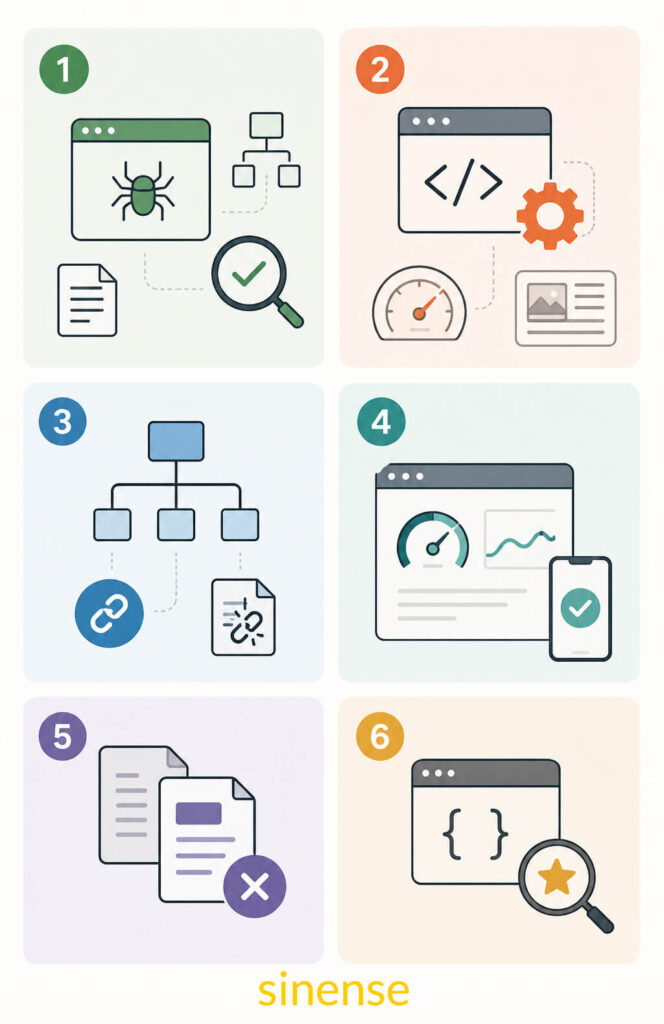
SaaS Technical SEO Checklist (Audit)
Work through these categories in order. I’ve flagged each by severity so you know where to focus first.
Category 1: Crawling and Indexation (Severity: Critical)
This is where most audits should start. If Google can’t crawl your pages, nothing else matters.
- Pull up Google Search Console’s URL Inspection tool and test your most important page types-
- acquisition pages,
- feature pages,
- pricing,
- integrations, and
- docs.
- Run a crawl with Screaming Frog or Sitebulb and identify any pages blocked by robots.txt that should actually be indexable.
App routes, staging environments, and API documentation endpoints get misconfigured all the time on SaaS platforms. - Check your XML sitemap. 72% of sites have one. But having it alone isn’t enough.
Is it up to date?
Does it include only the pages you actually want indexed?
Has it been submitted to the Search Console? - Hunt for orphaned pages. These are indexable URLs with no internal links pointing to them.
These hide constantly in docs and integration directories that grow faster than navigation structures keep up with.
Category 2: Rendering and JavaScript (Severity: Critical)
This is where SaaS companies get hurt the most and notice it the least.
- Run Screaming Frog with JavaScript rendering disabled. Compare that output to a standard crawl.
Any content showing up in the normal crawl but missing from the no-JS crawl?
That content is invisible to Google until it executes your JavaScript. And that’s a problem. - Use Google’s Rich Results Test and the URL Inspection tool to see exactly what Googlebot is actually seeing on your pages.
- Confirm that your H1 tags, meta descriptions, body copy, and internal links are all present in the pre-rendered HTML, not injected dynamically after the page loads.
Category 3: Site Architecture and Internal Linking (Severity: High)
- Map your entire URL structure by intent category: acquisition, feature, comparison, docs, support, integrations.
- Identify any pages that are more than three clicks from the homepage. Deep pages get crawled less frequently and receive fewer internal link signals.
- Find your broken internal links. Semrush’s large-scale data shows 42% of sites have broken links.
On SaaS platforms with evolving docs and integration pages, this number is often even higher.
Category 4: Core Web Vitals (Severity: High)
- Run the Core Web Vitals report in Google Search Console, broken out by page type groups.
- Here’s a sobering stat: only about 40% of sites pass all Core Web Vitals thresholds.
For B2B SaaS, where roughly 80% of buyers research on mobile, failing these metrics directly hits both rankings and conversion. - Pay close attention to LCP on pricing and feature pages. Heavy hero images and animated feature showcases above the fold are common culprits.
- Check CLS on pages with dynamically loaded elements, banners, or cookie consent overlays.
Category 5: Duplicate Content and Canonicalization (Severity: High)
- Crawl for duplicate title tags and meta descriptions across feature variants, pricing tiers, and localized pages.
- Find the URL parameter patterns generating near-duplicate pages. Sorting controls, filtering, session tokens, UTM parameters – these create URL variants constantly on SaaS platforms.
- Make sure canonical tags are correctly implemented and self-referencing on unique pages.
Category 6: Schema Markup (Severity: Medium)
- Check whether you have structured data on your pricing pages, feature pages, FAQ sections, and software application pages.
- Validate everything with Google’s Rich Results Test.
78% of sites use some form of schema. But bad implementation is worse than useless. Invalid markup produces zero benefit.
What Are the Most Common Technical SEO Issues on SaaS Platforms?
I’ve worked with enough SaaS companies to know that certain problems show up over and over again, regardless of how sophisticated the engineering team is.
Here’s what you’re most likely dealing with.
Client-side rendering with no fallback.
React, Vue, Angular – these are the frameworks most SaaS platforms are built on. And they all render content in the browser via JavaScript.
Google can handle JavaScript, but it does so on a delay with constrained resources.
Pages that rely entirely on client-side rendering for their main content – headings, body copy, internal links – consistently underperform in organic search.
It happens even when the content itself is great.
Thin and duplicate product pages at scale.
SaaS platforms are very good at generating URLs such as –
- Pricing pages with different plan parameters.
- Feature pages filtered by use case.
- Documentation with session-based URL variations.
Without proper canonicalization and parameter handling, all of those variations fragment your link equity and send mixed indexing signals to Google.
Crawl budget wasted on non-indexable URLs.
App routes, user dashboards, admin panels, API endpoints keep showing up in SaaS sitemaps and getting linked internally, sending Googlebot into dead ends.
Every crawl request wasted on these pages is a request that didn’t go to your acquisition pages.
Broken links in documentation.
Docs grow fast. Products evolve.
When documentation URLs change without proper redirects, broken links multiply.
The 42% broken-link prevalence in large-scale crawl data is not evenly distributed. Documentation-heavy SaaS sites often exceed that significantly.
Missing or misapplied schema markup.
SaaS platforms have multiple schema opportunities –
- SoftwareApplication,
- FAQ,
- HowTo,
- Review,
- BreadcrumbList
But they’re consistently absent on the pages where they’d drive the most impact: pricing, feature comparisons, and technical docs.
SaaS Technical SEO Best Practices
Here’s something I want you to understand about technical SEO for SaaS.
The fundamentals don’t change.
What changes is how you implement them inside an engineering organization where every fix requires developer time, sprint planning, and prioritization against product work.
That’s the operational challenge. And most teams handle it poorly.
So, let me give you the practices that actually make a difference in B2B SaaS environments.
- Get SEO into the sprint.
Technical fixes that need engineering- rendering changes, redirect implementation, schema markup, sitemap automation will never ship if they’re submitted as random ad hoc requests.
You need a defined process where SEO issues get triaged, estimated, and slotted into sprints alongside product work.
Treat technical SEO debt the same way you treat engineering debt.
- Build an SEO QA step into your deployment process.
Before any significant release- new page templates, URL structure changes, navigation updates, internationalization rollouts-run a defined set of technical checks.
Are canonical tags present on new templates?
Are new page types included in the sitemap?
Has anything been accidentally blocked in robots.txt?
Have Core Web Vitals regressed?
This takes less time than fixing problems after they’re live.
- Prioritize by revenue impact, not technical severity.
Not all technical issues are equal.
A rendering problem on your primary acquisition page- the one targeting your most valuable keyword-is more urgent than a canonical inconsistency on a low-traffic integration page.
When you frame issues in terms of the revenue they protect or unlock, prioritization becomes a lot simpler for both SEO and engineering teams.
- Keep your marketing site separate from your product application.
Whenever you can, maintain your marketing site on infrastructure that’s independent from the core app.
This lets you move fast on technical SEO changes-URL restructuring, template updates, redirect implementations-without pulling product engineers in or risking app stability.
- Document your URL architecture now, before you need to.
URL structures grow chaotic over time in SaaS.
Every new product area adds its own pattern.
Define your URL hierarchy conventions for each page type and enforce them consistently.
Retroactive URL restructuring is expensive and carries real index risk.
How Does Site Architecture Affect SaaS Product Discoverability?
I want you to think about site architecture differently than most guides will tell you.
It’s not just about folder structure or URL patterns. Site architecture is the system that determines how search engines navigate your site and how link authority flows across pages. Poor architecture in a SaaS environment doesn’t just hurt one page.
It systematically reduces the visibility of your entire product in search.
SaaS SEO Site Architecture
The right approach is to organize your architecture by user intent category, then build a hierarchy that reflects the relative priority of each category.
Acquisition pages come first.
Homepage, product overview pages, use-case pages, industry landing pages.
These are your primary commercial targets. They should sit at the shallowest level of your hierarchy.
They should be one or two clicks from the root domain and receive the most internal link authority.
Feature and product pages go one level deeper.
These support your acquisition pages by providing depth on specific capabilities.
Keep URL patterns consistent (/features/[feature-name] or /product/[capability]) and make sure they link both upward to acquisition pages and laterally to related features.
Comparison and alternative pages are high-value assets that most SaaS companies underinvest in.
Someone comparing your product to a competitor is inches from a purchase decision.
These pages deserve dedicated URLs, strong internal linking from relevant feature pages, and enough depth to genuinely address the comparison.
Integration pages are an underutilized long-tail goldmine.
Many SaaS companies have dozens or hundreds of integration partners.
A well-structured integration directory-individual pages for each partner at /integrations/[partner-name]-captures substantial long-tail volume from users searching for specific tool combinations.
Most companies treat this as an afterthought. Don’t.
Documentation and support content needs careful management.
Index it where it genuinely works as an acquisition asset-technical buyers often research through documentation before ever contacting sales.
But manage it carefully so it doesn’t dilute the crawl allocation going to your commercial pages.
Three questions to ask about every page in your architecture:
Can Googlebot reach it efficiently?
Does it receive enough internal link authority to compete for its target keywords?
Does the URL clearly signal what the page is about?
If any answer is no, something needs to change.
Should SaaS Apps Use Server-Side Rendering (SSR) or Client-Side Rendering (CSR) for SEO?
I get this question constantly from SaaS teams.
And the honest answer is: it’s not a binary choice.
Render Strategies for SaaS SEO (SSR vs CSR)
Here’s the core issue. Google can process JavaScript.
But it does so in a second wave of rendering that introduces delay and resource limitations.
Pages that deliver fully rendered HTML to Googlebot-server-side-get indexed faster and more reliably.
Pages that depend on JavaScript to populate their primary content get indexed more slowly and less consistently.
That’s the reality you’re working within. So here’s how to make the right call by page type.
Full SSR: Use it on every page where organic search matters.
It is the appropriate choice for all pages where organic search visibility is a business objective. This includes acquisition pages, feature pages, pricing pages, comparison pages, integration directory pages, and indexable documentation.
These pages must be fully rendered and accessible to Googlebot without JavaScript execution.
There’s no acceptable workaround here.
Static Site Generation (SSG): Use it for infrequently changing content.
Marketing pages, blog posts, documentation on a defined publication schedule.
SSG produces pre-rendered HTML, delivers excellent performance, and gets indexed reliably at low server cost.
It’s often the right default for your marketing site.
Selective SSR with client-side hydration: Use it for pages with dynamic elements but static core content.
Render the primary content server-side, then hydrate interactive components client-side after load.
This is the model most modern Next.js implementations follow.
It balances SEO reliability with the application interactivity your users expect.
Full CSR: Use it only for pages you don’t want indexed.
Authenticated dashboards, user account pages, admin interfaces, application functionality behind a login wall.-these pages have no organic search objective.
So render them however makes most sense for your app. CSR is fine here.
The biggest mistake I see SaaS companies make?
They default to CSR across the entire application because that’s how the app was built, then try to fix SEO problems after the fact.
Building SSR or SSG into your public-facing routes from day one is dramatically cheaper than retrofitting it later.
How Do I Handle Indexing and Crawlability for SaaS Multi-Tenant Subdomains/Subfolders?
Multi-tenant SaaS architecture creates indexing problems you won’t find in any standard SEO guide.
When every customer gets their own subdomain (customer.yourapp.com) or subfolder (/app/customer-name/), you’re dealing with a scale of URL generation that needs deliberate management.
How to Fix Indexing Issues of SaaS
Here’s the foundational rule: user-facing application URLs should almost never be indexed.
Customer dashboards, user-generated workspaces, and tenant-specific application routes exist for logged-in users. Not for Google.
Letting these get crawled and indexed wastes your crawl budget, creates duplicate content at scale, and can expose application structure that shouldn’t be publicly visible.
Fix it like this:
- Block all app-level tenant URLs in robots.txt.
Use Disallow directives that cover the full pattern generating those routes, whether that’s a subdomain wildcard or an application directory path. - If you’re using tenant subdomains, double-check that wildcard DNS records aren’t accidentally pointing to indexable content.
A wildcard that resolves user subdomains to your application is expected.
It’s a misconfiguration that exposes tenant data to Googlebot is a serious problem. - Use the noindex meta tag as a second layer of protection on any tenant-route templates that might occasionally be accessible without authentication.
Robots.txt controls crawling. Noindex controls indexing. Use both where the stakes are high. - Go into Search Console and check whether any tenant URLs have slipped into the index anyway. Submit removal requests for anything that shouldn’t be there.
For SaaS companies with public-facing customer-branded subdomains-public landing pages, published reports, customer portals-handle these intentionally.
If you want them indexed, give them their own canonical handling, structured data, and sitemap submissions in Search Console.
Crawl Budget for SaaS Websites
Here’s something a lot of smaller SaaS teams don’t think about until it’s already a problem: crawl budget.
Googlebot has a limit on how many pages it will crawl on your site within a given period.
For small sites, this doesn’t matter much. For large SaaS platforms with thousands of URLs across product pages, docs, integrations, and localized content.
It’s a management priority.
Your goal is to make sure Googlebot spends its crawl allocation on the pages that generate revenue, not on parameter-generated duplicates, broken URL variants, or dead-end app routes.
Here’s what to do:
- Write robots.txt rules that exclude every non-indexable URL pattern: app routes, session-parameterized URLs, admin paths, API endpoints, test environments.
- Use the URL Parameters tool in Google Search Console to specify how your common parameter patterns should be handled.
Tracking parameters (UTM), session tokens, and display preferences that don’t change page content should be flagged as non-differentiating. - Keep your XML sitemap clean and current.
Only include URLs you actively want indexed.
Automate sitemap generation so it reflects your real URL inventory accurately, and remove deprecated pages promptly. - Watch your crawl stats in the Search Console.
A sudden spike in crawls on low-value URL patterns or a drop in crawl activity on your key acquisition pages signals a configuration problem that needs attention. - Implement 301 redirects fast for any deprecated URLs. Every broken URL that gets crawled is a wasted opportunity to index a page that matters.
How Do I Fix Duplicate Content and Canonicalization on SaaS Documentation and Product Pages?
Let me be clear about something: duplicate content in SaaS is almost never about copying someone else’s work.
It’s an infrastructure problem.
SaaS platforms generate duplicate and near-duplicate URLs systematically through parameter patterns, content reuse across product tiers, and documentation structures that push the same content to multiple paths.
The fix starts with a real diagnosis.
Don’t start implementing canonical tags everywhere before you understand the patterns creating duplication.
Crawl your site with a tool that identifies near-duplicate pages by content similarity, find the structural patterns generating the problem, and solve at the root, not page by page.
URL parameter canonicalization is usually the most widespread issue.
When sorting, filtering, or session parameters create URL variants of the same page “/features/integrations?sort=popular versus /features/integrations” implement canonical tags pointing to the preferred URL, or handle it in Search Console’s parameter configuration.
Where parameters create genuinely distinct content (pagination, for instance), use explicit canonical logic rather than blanket rules.
Documentation canonicalization needs careful thinking. Doc systems frequently publish the same content under multiple paths: a versioned URL, a stable URL, sometimes a locale-specific path.
Decide which URL is canonical for each document, implement self-referencing canonicals, and use hreflang for localized variants rather than treating them as duplicates.
Product page variants are tricky. If a SaaS platform creates separate pages for the same feature across different use cases or industries.
Ask honestly:
Are these genuinely differentiated?
Different examples, different workflows, different customer context?
They can stand as independent indexed pages. But if they’re largely the same with surface-level copy swaps, consolidate and pick one canonical URL.
Pricing page variants need special attention. Billing cycle toggles, plan selection parameters, currency switches generate multiple URLs for what’s functionally one page constantly.
Canonical tags on all variants pointing to the base pricing URL, and make sure dynamically loaded pricing content is rendered server-side so Googlebot sees the full page regardless of which variant it hits.
How Do Redirects, Hreflang, and URL Parameters Impact SEO for International SaaS Sites?
Going international with your SaaS product is a big deal. The technical SEO layer that comes with it is often bigger than teams expect.
Getting this right requires three things working together: a coherent URL structure for your localized content, correctly implemented hreflang annotations, and redirect logic that serves the right content to the right audience without breaking your indexing.
Choosing your international URL structure comes down to three options:
- Country-code top-level domains (ccTLDs) like yourapp.de
- Subdomain-based localization like de.yourapp.com
- Subfolder-based localization like yourapp.com/de/
For most SaaS companies, subfolders are the right answer.
They consolidate your domain authority, simplify server configuration, and give you clean, manageable URL patterns at scale.
ccTLDs make sense if you’re operating genuinely separate country businesses with the budget to build independent domain authority for each.
Subdomains fall in between and need more careful management to actually benefit from root domain authority.
Hreflang tells Google which version of a page to show which audience. The annotations must be bidirectional. Every localized version of a page must reference all other versions, including itself.
Errors in hreflang implementation are common and consequential-
- missing reciprocal annotations,
- incorrect language codes,
- mismatched URLs between the hreflang annotation and the actual page and
- non-indexable URLs in hreflang sets.
These all create problems that can come up with the wrong language version in the wrong market.
Validate your hreflang implementation with a dedicated tool and audit every page type-
- documentation,
- feature pages,
- pricing.
Each localized version needs its own complete hreflang set.
URL parameters and international SEO are a combination that trips teams up constantly.
If your platform uses parameters to switch language or currency rather than distinct URLs, those parameters need explicit canonical handling.
A URL that shows English content to some users and German to others based on a session parameter, but always returns the same canonical URL, sends contradictory signals.
Language and locale belong in the URL structure, not in cookies or parameters.
Be careful with geo-based redirects. Automatically redirecting users from Germany to /de/ sounds like good UX.
But Googlebot crawls primarily from US-based IP addresses, which means automatic geo-redirects send Googlebot to the English version exclusively.
If you implement geo-based redirects, use client-side JavaScript detection that excludes Googlebot, or use a language-selector UI component instead of an automatic redirect.
How Does Structured Data/Schema Help SaaS Product Pages and Docs Rank?
Schema markup is consistently one of the highest-leverage, lowest-effort technical improvements available.
Schema markup tells Google exactly what your page is about, what entities it contains, and how its content should be understood.
For SaaS platforms, this matters in three ways.
It unlocks rich result eligibility. It strengthens Google’s entity understanding of your product. And it reinforces topical relevance signals on pages where the content alone may not clearly communicate intent.
Structured Data for SaaS Product Pages
Here are the schema types that matter most for SaaS and where they belong:
SoftwareApplication goes on your primary product and feature pages.
It tells Google your software’s category, OS compatibility, pricing, and aggregate rating in a structured, parseable format.
Correct implementation supports eligibility for software-specific rich results and helps Google understand what your product actually does.
Product and Offer schema belong on pricing pages where plan structure, pricing, and billing options are present.
Pair them with AggregateRating schema when you have real customer review data, and you can achieve rich result eligibility that meaningfully increases click-through rate on high-intent pricing queries.
FAQ schema goes on any page with a genuine question-and-answer structure:
- documentation,
- support articles, and
- feature pages with structured FAQ sections.
Validated FAQ schema can trigger expanded search results that grow your SERP footprint without requiring you to rank higher.
HowTo schema applies to step-by-step guides, onboarding walkthroughs, and technical implementation documentation.
For SaaS platforms serving developers or technical buyers, strong HowTo schema on documentation pages produces rich result coverage on procedural search queries.
BreadcrumbList schema should span your entire site.
It’s especially valuable for documentation and multi-level product hierarchies.
It helps Google understand your site structure and produces breadcrumb display in search results that improves click-through rate and user orientation.
Best Practices for Implementing Structured Data on SaaS Feature Pages
Implementation quality is everything. Here’s the process:
- Start by identifying the correct schema type for each page based on its primary content and Google’s published rich result eligibility criteria.
- Implement all structured data in JSON-LD format embedded in the page head.
JSON-LD is Google’s preferred format and the cleanest to maintain at scale in SaaS environments where structured data is often generated dynamically from templates. - Validate every implementation using Google’s Rich Results Test before it ships to production. Invalid markup produces zero SEO benefit.
In some cases it creates noise in Google’s interpretation of the page. - Monitor performance in Search Console’s Enhancements reports.
Track which page types are detected, which have validation errors, and whether rich results are actually appearing in search.
If they’re not appearing, there’s either a validation error or an eligibility issue to investigate. - Keep structured data synchronized with page content. When your pricing structure changes, your Offer schema must reflect that change.
Stale structured data that contradicts visible page content can cause Google to discount the markup entirely.
What Metrics Should I Track to Measure Technical SEO Success for SaaS?
Most SaaS teams make the same measurement mistake. They run an audit, implement a bunch of fixes, and then check rankings a few weeks later. When rankings haven’t dramatically shifted, they assume the technical work didn’t matter.
That’s the wrong measurement model.
You need to separate leading indicators from lagging indicators. Leading indicators tell you whether your technical improvements are working before rankings change.
Lagging indicators tell you the downstream business impact after rankings change. Both matter. But they operate on different timelines.
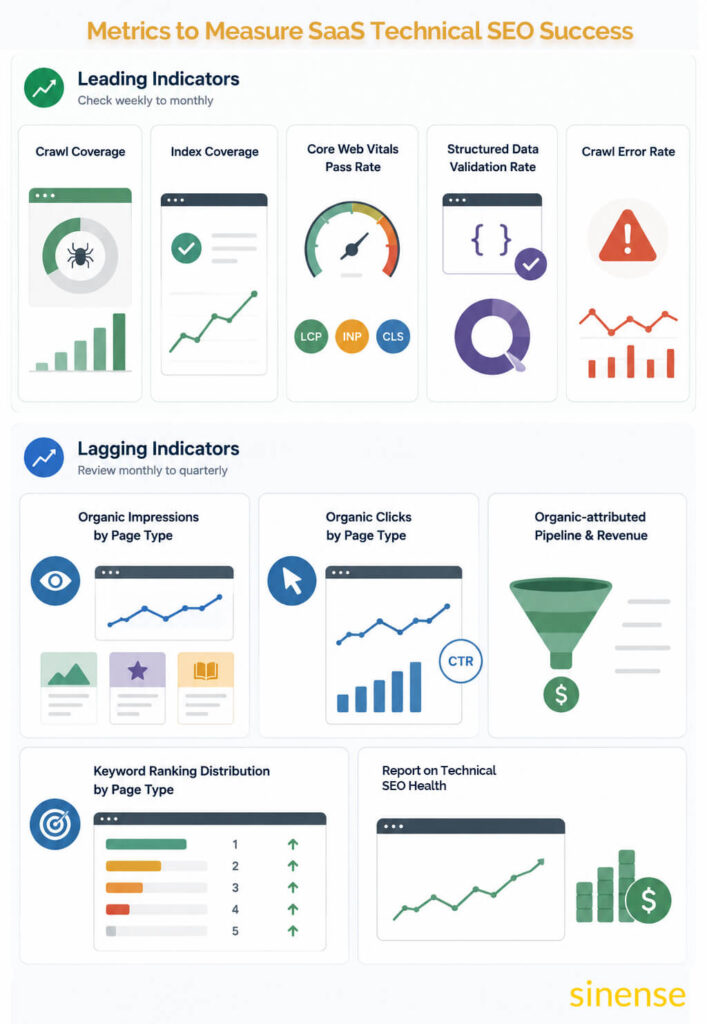
Leading Indicators (check these weekly to monthly)
- Crawl coverage is the ratio of pages Googlebot successfully crawls to the total number of indexable pages on your site.
Track this through Search Console’s Coverage report alongside third-party crawl data. Improvements in crawl coverage consistently precede ranking improvements by two to four weeks. - Index coverage is the count of target pages confirmed as indexed in Search Console.
Unexpected drops in indexed page counts are early warning signals for robots.txt misconfigurations, canonicalization problems, or server errors affecting specific page type groups. - Core Web Vitals pass rate means that at least 75% of its page loads show “Good” performance for all three key metrics:
- Largest Contentful Paint (LCP) – measures loading speed
- Interaction to Next Paint (INP) – measures responsiveness
- Cumulative Layout Shift (CLS) – measures visual stability
It should be tracked by URL group, not as a site-wide aggregate. A high pass rate on your homepage tells you nothing useful if your pricing pages are failing on mobile. Segment by acquisition pages, feature pages, and documentation separately.
- Structured data validation rate is the percentage of your schema implementations passing validation in Search Console’s Enhancements reports. A declining rate means templates generating invalid markup need attention.
- Crawl error rate is the volume of 4xx and 5xx errors normalized against total pages crawled.
Rising error rates are a leading indicator of growing technical debt before it affects rankings.
Lagging Indicators (review these monthly to quarterly)
- Organic impressions by page type tracked in Search Console for each intent category separately.
It shows whether your acquisition pages, feature pages, and documentation are gaining visibility following technical improvements. - Organic click volume by page type shows whether growing impressions are translating into traffic.
Watch click-through rate alongside raw click volume. Rising rich result coverage and improved rankings should lift CTR. - Organic-attributed pipeline and revenue is ultimately what justifies technical SEO investment to your leadership team.
If your CRM supports channel-level organic attribution, connect technical improvements directly to pipeline contribution. - Keyword ranking distribution by target page type shows the ranking position movement for keyword clusters tied to each page type group.
Technical improvements should produce measurable ranking gains within a few weeks of implementation. - Report on technical SEO health monthly. Review business-level lagging indicators quarterly.
Document every major initiative clearly enough to demonstrate what changed before and after, so you can make the case for the next investment confidently.
Technical SEO Tools for SaaS Companies
The right tool stack is what separates teams that find problems fast from teams that spend months chasing symptoms.
Here’s what I recommend for SaaS companies based on what we use at Sinense.
Crawling and Auditing
- Screaming Frog SEO Spider is the industry standard for technical site crawls.
Run it in both JavaScript-rendering and non-JavaScript modes. The comparison between those two crawl outputs is one of the most diagnostic data points available for SaaS platforms with rendering problems.
Use it to find broken links, duplicate content patterns, canonicalization inconsistencies, and architectural issues at scale. - Sitebulb is a strong alternative with more intuitive architecture visualization.
If you’re presenting technical findings to non-technical stakeholders including executives or product managers, Sitebulb’s reporting format is significantly easier to communicate.
Index and Performance Monitoring
- Google Search Console is non-negotiable.
No third-party tool provides the same authoritative data on crawl coverage, index status, Core Web Vitals by URL group, rich result performance, and manual actions. Build your monitoring workflow around it. - Ahrefs and Semrush both provide complementary data on keyword rankings, backlink profiles, and organic traffic trends alongside technical audit functionality.
So, pick one as your primary external platform and use it consistently so trend data accumulates reliably.
Rendering and Performance Testing
- Google’s Rich Results Test is essential before deploying any schema implementation.
It shows you exactly what Google sees when it renders a specific URL and validates your structured data simultaneously. - PageSpeed Insights provides Core Web Vitals with both real-world field data and lab-based diagnostic data.
Use it to prioritize which performance improvements will have the highest impact on your actual user population. - WebPageTest gives you more detailed performance profiling than PageSpeed Insights.
Its waterfall view helps you identify exactly which resources, third-party scripts, or rendering sequences are responsible for LCP and CLS problems.
Log File Analysis
- Screaming Frog Log Analyzer or Splunk: Server logs show you exactly how Googlebot is spending your crawl budget —
- Which URLs is it visiting?
- At what frequency?
- With what response codes?
Critical for large SaaS platforms diagnosing crawl budget issues.
International SEO
- The hreflang Tags Testing Tool by Aleyda Solis is the fastest way to validate hreflang implementation across your localized page set. Add it to every international SEO audit without exception.
Technical SEO for SaaS Platforms: Examples
Let me show you how these principles play out across different types of SaaS businesses.
Developer Tool SaaS: The Documentation-Heavy Platform
Think API platforms, cloud infrastructure, development toolkits.
These companies typically have documentation that serves two distinct audiences simultaneously: existing users looking for implementation guidance and prospective buyers researching technical depth before purchase.
The technical SEO priorities here are precise.
Control crawl budget so documentation is indexed efficiently rather than spreading Googlebot across hundreds of rarely-visited reference pages.
Implement HowTo and FAQ schema on procedural content. Build and maintain redirect chains every time documentation is reorganized for new product versions, which happens constantly.
Create a clear internal linking structure that connects documentation back to acquisition pages so link authority flows in the right direction.
Horizontal SaaS: The Project Management or CRM Platform
Serving multiple industries and use cases creates significant URL surface through use-case pages, industry landing pages, and feature intersection pages.
The technical priorities shift to managing canonical relationships between overlapping page types to prevent signal fragmentation. Implement SoftwareApplication and AggregateRating schema on core product pages. Maintain full SSR across the acquisition and feature page inventory. These sites make large investments in organic search and need the technical foundation to match.
Vertical SaaS: The Industry-Specific Platform
Legal tech, healthcare tech, construction software – these companies compete on a smaller keyword set where commercial intent per query is very high.
Technical SEO priority shifts to precision.
Every high-intent page must be fully indexable and rendering correctly. Structured data must be accurate and current.
Core Web Vitals performance must be strong enough to win in competitive positions where the difference between ranking first and ranking fifth translates directly to revenue.
Multi-Product SaaS: The Suite or Platform Company
Multiple distinct products under one domain means managing product hierarchy in URL structure, allocating crawl budget across multiple product surfaces, and maintaining canonical clarity between shared capabilities and product-specific feature pages.
International expansion compounds the complexity when individual products aren’t available across all markets.
In every one of these scenarios, the underlying principles are identical.
Googlebot must reach the pages that matter. Those pages must render completely and signal their intent clearly.
The site architecture must direct authority toward revenue-generating pages. The foundation makes everything else possible.
Conclusion
Here’s the bottom line.
SaaS technical SEO isn’t a one-time project. It’s an ongoing discipline.
One that evolves as your platform grows, your content expands, and search engines change.
The companies that win at organic search treat technical SEO as infrastructure, not cleanup.
They build processes that catch problems before they ship. They measure results with enough rigor to connect technical work to revenue outcomes.
They make the business case for ongoing investment instead of treating every audit as a standalone event.
The 702% ROI from SaaS organic search is real. I’ve seen it firsthand with the companies we work with.
But that return doesn’t come from content alone.
It comes from content supported by technical infrastructure that actually works.
One that lets Google find your pages, render them correctly, understand what they’re about, and rank them for the queries your best prospects are searching.
Start with the audit.
Fix what’s blocking indexing. Optimize your architecture for the pages that drive revenue.
Then measure everything. Use what you learn to keep improving.
The opportunity is real. The question is whether you build the foundation to capture it.
